
Try on outfits virtually with FitVibe
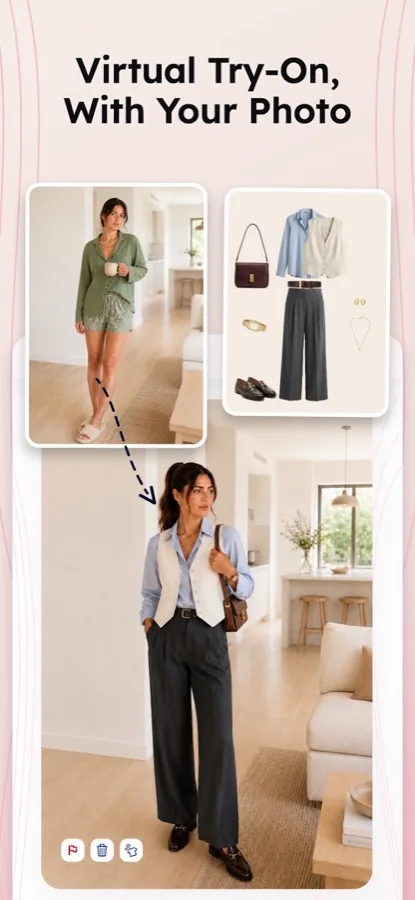
Yes: FitVibe is an iPhone, iPad and Android app with virtual try-on. Upload one photo of yourself, pick an outfit from your closet or any clothing photo, such as a product image from an online shop or a look saved from Pinterest, and FitVibe generates an image of you wearing it.
How it works
- 01
Add a photo of yourself
A full-length photo works best, such as a mirror selfie. FitVibe uses it as the base for every try-on.
- 02
Pick an outfit or any clothing photo
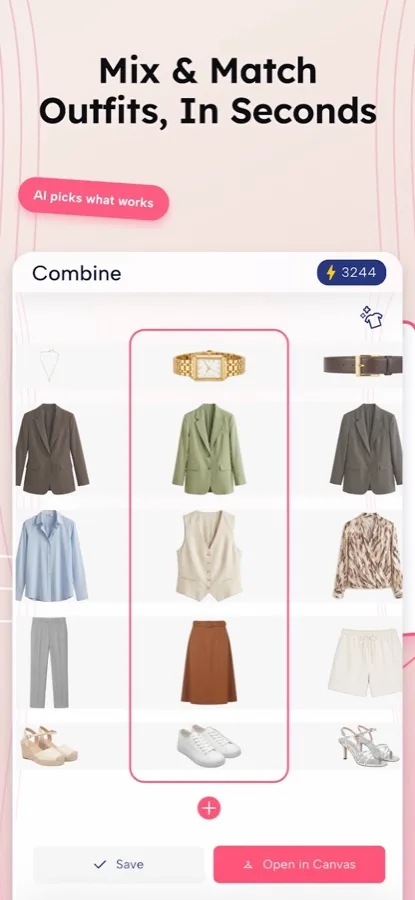
Choose an outfit from your closet, one the AI stylist suggested, or one from your outfit calendar. You can also add a photo of clothes you don't own yet, like a product image from a shop such as Zara or a look you saved on Pinterest.
- 03
See it on you
FitVibe generates an image of you wearing the outfit. Keep it, swap a piece and try again, or plan it for a day of the week.
See it in action
See it on you first.

 After · generated try-on
What makes FitVibe's virtual try-on different
It is on you, not on a model
The try-on uses your own photo, so you see the outfit on your body rather than on a stock model or an avatar.
Try before you buy
Try on clothes you don't own yet from a shop's product photo or a Pinterest picture, and see how they look on you before you order.
It works with your wardrobe
You can also try on outfits made from the clothes in your FitVibe closet, then plan them on the outfit calendar.
One photo is enough
You do not need a body scan or measurements. A single photo of yourself is the starting point.
Questions about FitVibe's virtual try-on
Is there an app to try on outfits virtually?
FitVibe is an iPhone, iPad and Android app with virtual try-on. You upload one photo of yourself, pick an outfit from your closet, and FitVibe generates an image of you wearing it.
How does FitVibe's virtual try-on work?
FitVibe uses AI to generate an image of you in the outfit you picked, based on one photo of yourself. The result is an AI preview, so treat it as a guide to how colours and pieces work together rather than an exact fit check.
What kind of photo works best for virtual try-on?
FitVibe works best with a clear, full-length photo of you, such as a mirror selfie, so the whole outfit can be shown on you.
Can I try on clothes I don't own yet?
FitVibe lets you try on clothes you don't own. Give it a photo of the item, such as a product image from an online shop like Zara or a picture you saved from Pinterest, and FitVibe shows it on a photo of you before you buy.
More answers in the FitVibe FAQ.
What people say about FitVibe
From the App Store
loved it!
“not a want, a need”
Amazing
“Super”
More from FitVibe
- FitVibe homeThe AI outfit planner and closet organizer, in one app.
- Closet organizerScan your photo gallery to build a digital closet automatically, sorted by category.
- Outfit plannerPlan a week of outfits from the clothes you own and see them on a calendar.
Comparing apps? Read FitVibe vs Acloset or all comparisons.
Get FitVibe
Download FitVibe free and start building your closet today. Available on the App Store for iPhone and iPad and on Google Play for Android.